

AI shopping visibility platform for retailers
Shoppers now describe what they want to ChatGPT, Perplexity and Gemini, and the answer names a few products and a place to buy them. If your product is missing, or another stockist gets the link, the sale goes elsewhere. Sighted analyses visibility product by product, identifies catalogue gaps, enriches product information, optimises feeds for AI agents and Google Shopping, publishes to Shopify and supported channels, and measures subsequent visibility, traffic and sales.
Are AI assistants recommending the products you sell?
Take one product and one request. You sell a sand linen blazer at £145, and a shopper asks an assistant for “a breathable linen blazer for the office, under £150”. The answer can leave your blazer out, recommend one like it and link a department store, or recommend yours and link your product page. Only the last shows up in your analytics.
Sighted's founders came to this problem while building a shopping product themselves. SO-ME is the consumer shopping platform that sisters Molly and Connie Sishton co-founded. It brings products together from retailers including ASOS, Marks & Spencer and REVOLVE. Working with retailer catalogues exposed a recurring problem: a shopper describes an occasion, a preference or a constraint, and the product record uses an inconsistent category and leaves out a useful attribute. They built Sighted to address that gap.
An AI shopping visibility platform should answer every question you have about that blazer, in order. Sighted does it in one workflow, and the rest of this page follows the blazer through it.
| Your question | What Sighted does |
|---|---|
| Do assistants recommend this product? | Asks ChatGPT, Perplexity and Gemini about each product, by name and by need, and records whether it was identified and recommended at your store |
| Does your store get the purchase link? | Records whether the answer named your store and linked your site or the product page |
| What in the catalogue is costing you? | Scores and grades every product and counts its issues |
| Can the gaps be filled from what you already know? | Writes attributes, titles, descriptions and FAQs from your own product information, for your approval |
| Where do the approved details go? | Into your Shopify store, and into feeds for AI agents and Google Shopping |
| Did traffic and sales follow? | Reports the answers over time beside visits, AI-referred visits, purchases and sales by product |
Which products do assistants recommend, and who gets the link?
Sighted asks ChatGPT, Perplexity and Gemini about each product in two ways. One question names it: “Where can I buy the Marlow Sand Linen Blazer in the UK?” The other is the office request, which names neither the product nor your store. The first shows who gets the sale once a shopper has chosen, the second whether your blazer enters the choice at all.
For every answer Sighted records whether it identified the product, recommended it, named your store, and linked your site or the exact product page. An answer that recommends a sand linen blazer and links another retailer is recorded as naming the product but not at your store, beside the retailer it named, so you see who got the link.
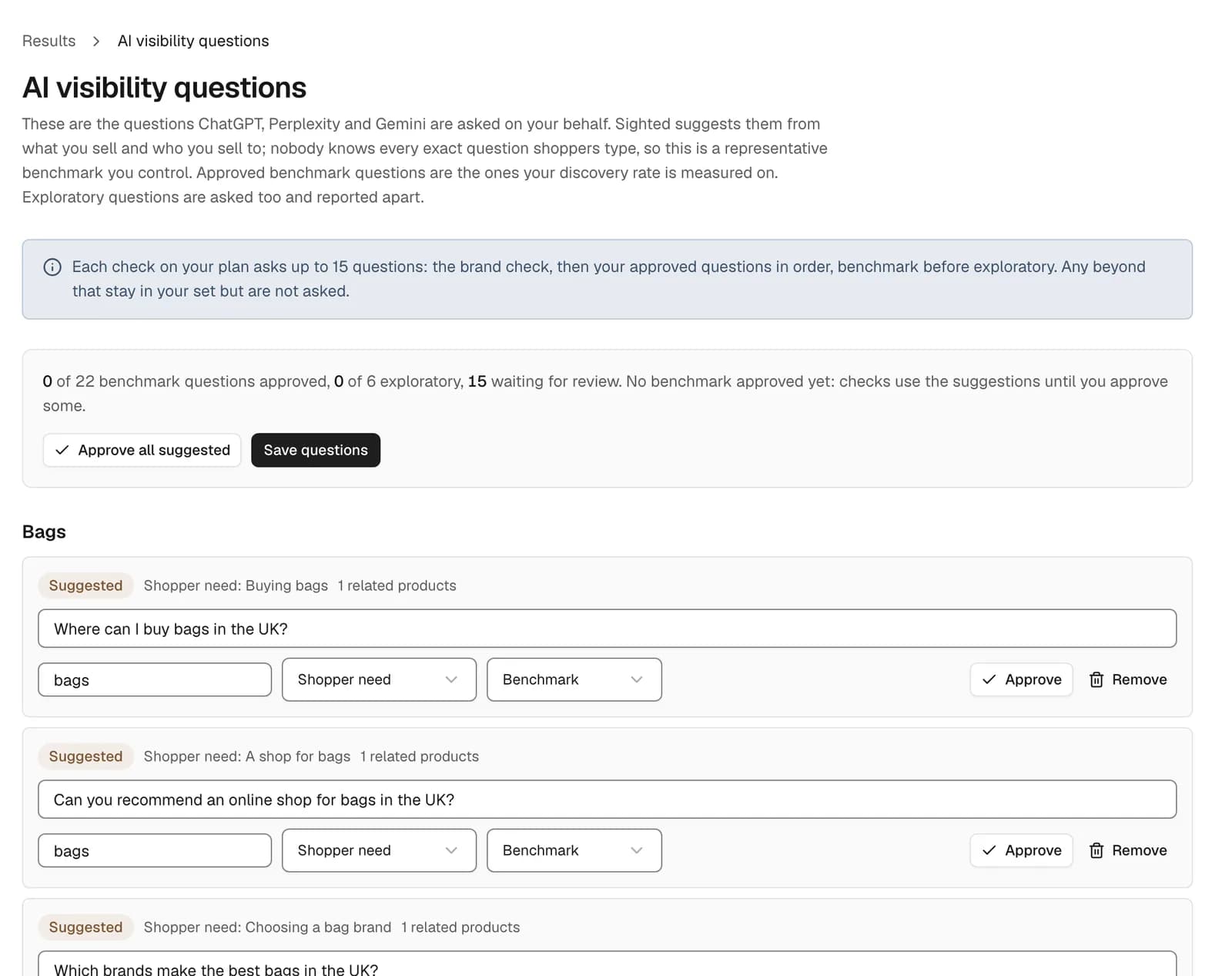
Across the whole store, Sighted suggests shopper questions from your catalogue and asks the set you approve again on a schedule, so one check can be compared with the next. AI shopping visibility tracking explains what each answer records.
What in your catalogue is costing you recommendations?
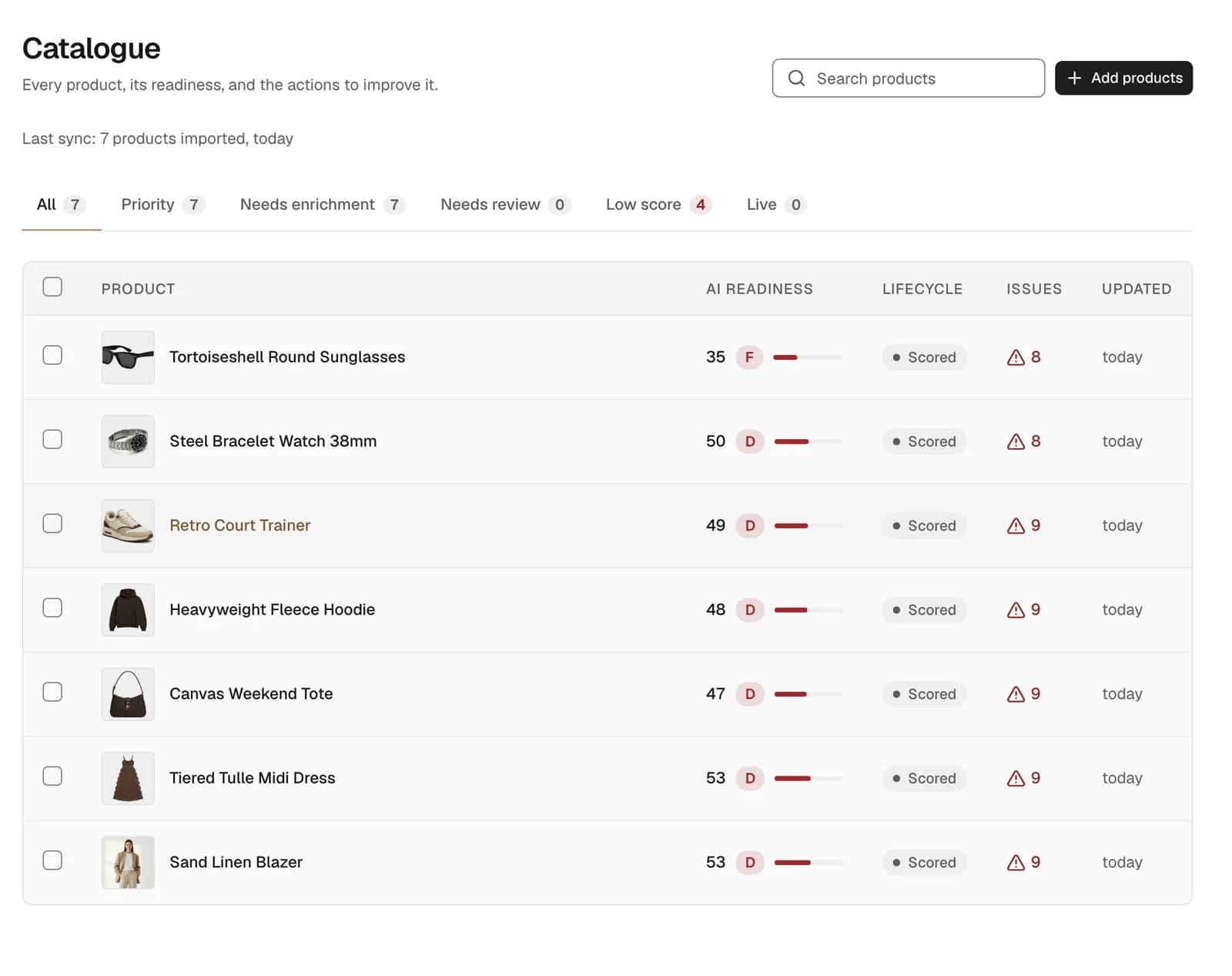
Every product you bring in is scored, graded and listed with a count of its issues, so you can see which to fix first. In the sample store below, the blazer scores 53, grade D, with nine issues.
Set the request beside the record. The blazer's whole description reads: “A relaxed single-breasted blazer cut from washed European linen in a warm sand tone. Half-lined so it breathes, with a notch lapel, patch pockets and horn-effect buttons. Wear it open over a tee or buttoned for the office.”
The shopper asked for linen, breathable and the office, and each of those facts is in that prose. Beyond two tags, linen and workwear, none is stated as a product detail an assistant can match on: the record has no material, lining, fit or occasion attribute.
How does Sighted fill the gaps without inventing anything?
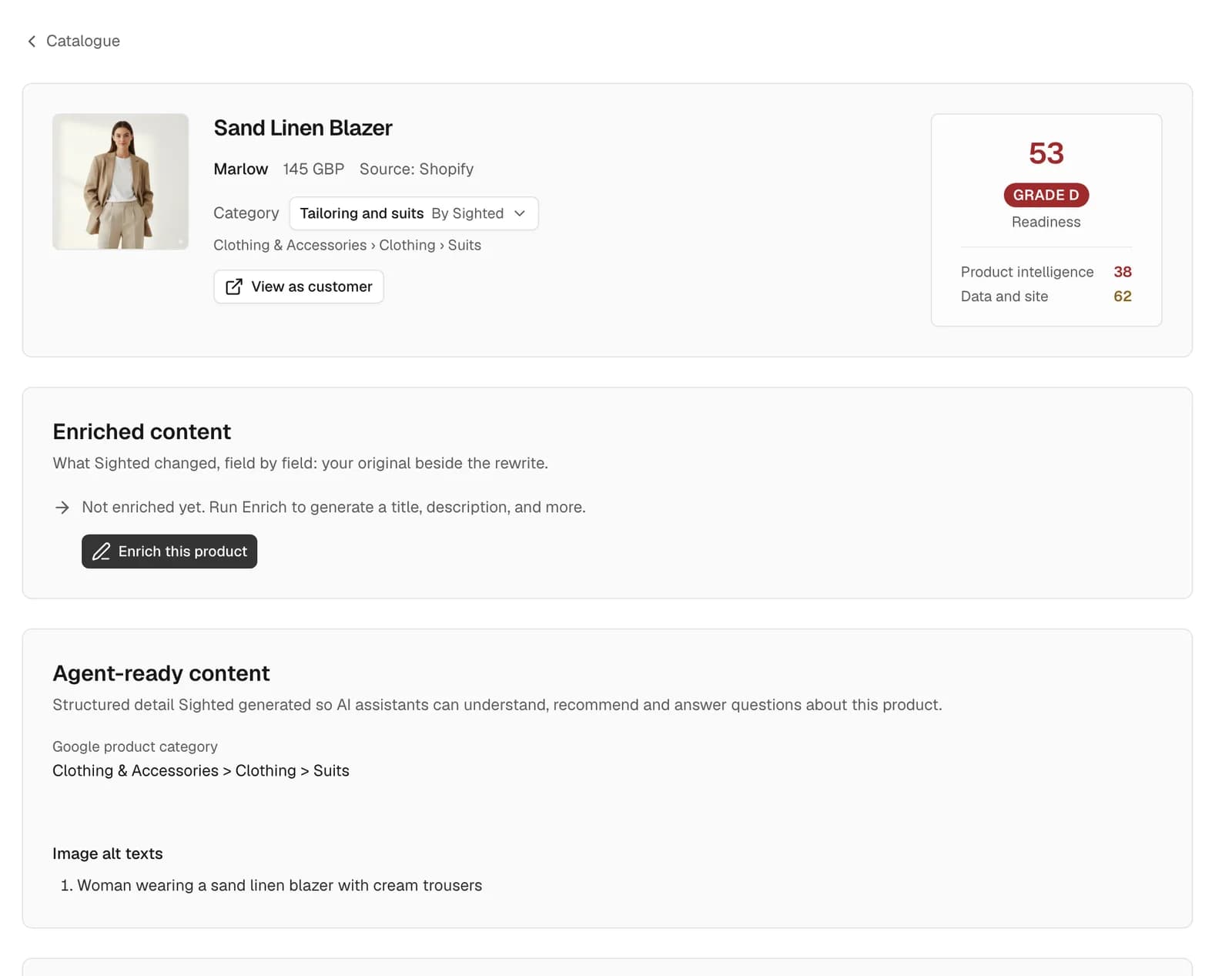
Enrichment writes attributes, titles, descriptions and FAQs from your own information: the product's existing data and options, its page on your site, and facts you have confirmed for the whole store. A photo counts only for what it plainly shows, such as a collar or a pocket, and never settles a fabric or a fit.
For the blazer, an illustrative example of the result:
| What the shopper asked for | In your product record today | After enrichment, from your description |
|---|---|---|
| Linen | The title, a tag and a sentence of prose | Material: linen |
| Breathable | “Half-lined so it breathes”, in prose | Lining: half-lined |
| A blazer for the office | A workwear tag and “buttoned for the office”, in prose | Occasion: office. Style: single-breasted, notch lapel, patch pockets |
| Under £150 | £145 | Unchanged: Sighted never rewrites a price |
| Fabric weight, or whether it suits a wedding | Not stated | Left out: your information does not say |
The rule is to state only what your information shows. Nothing you hold gives the blazer's fabric weight or says it suits a wedding, so the rewrite says neither, however likely it sounds. Measurements, certifications and fabric percentages are checked against your own information, and one Sighted cannot verify is held for you to check.
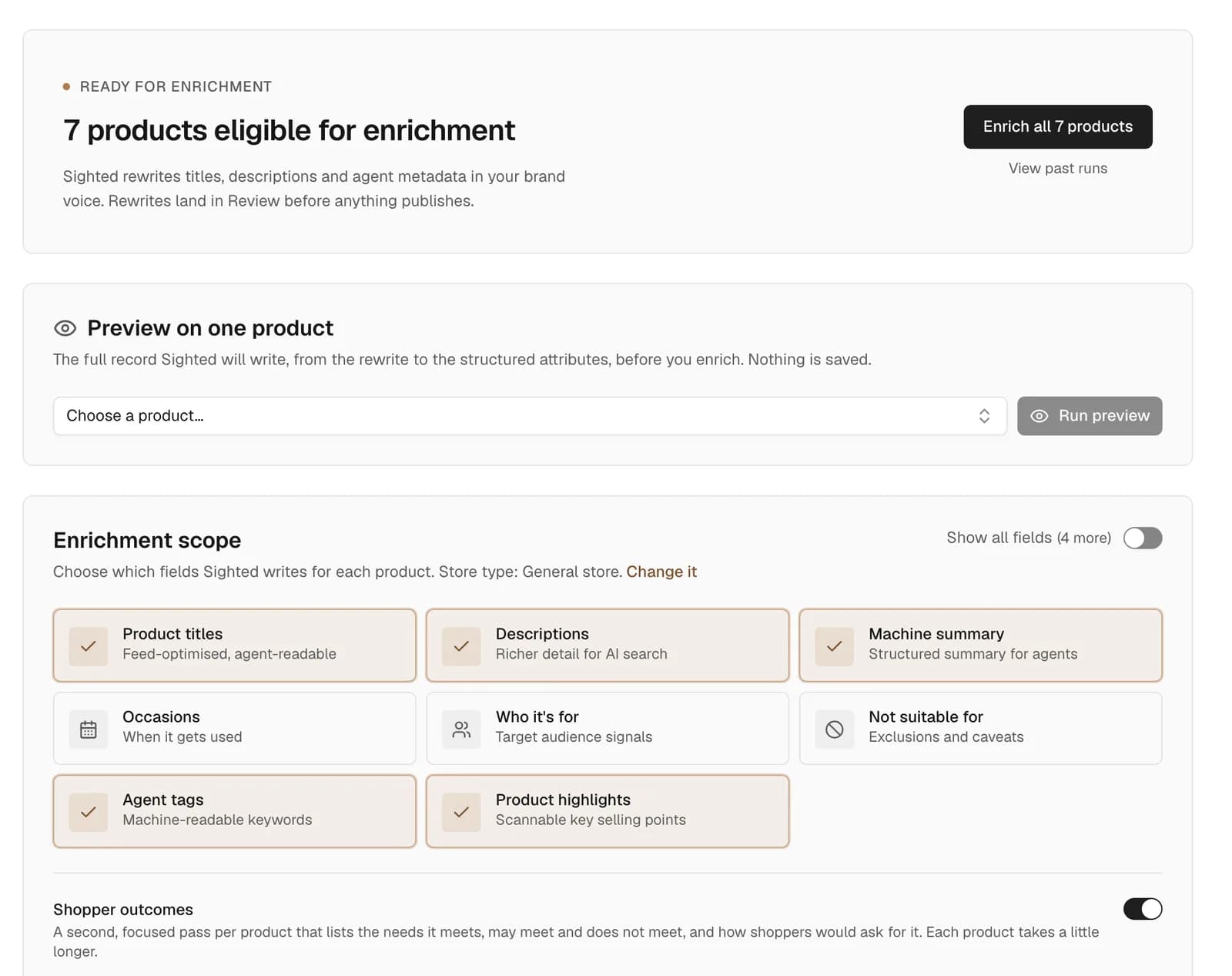
By default every rewrite waits in Review beside your original. You can edit it, approve it, reject it, or approve many at once, and a field you edit stays yours.
Where do the approved details go?
Approved details go into feeds for AI agents and Google Shopping: the title and description you approved, the product details, the highlights, and question-and-answer pairs, so “Is the blazer lined?” has its answer in the feed. A rewrite you have rejected or not yet approved never reaches a feed. Product feed optimisation covers what each feed carries.
Shopify connects directly and takes approved changes back into the store; any other store uploads a product file (CSV) or a link to a Google Shopping feed. On Shopify, the blazer's approved title, description and attributes are written to the product itself, and restoring your original is one click. The page on CSV and feed catalogues shows how the workflow runs from a file.
How do you see the visibility, traffic and sales that follow?
Sighted keeps the blazer's check from before enrichment and sets it beside the check after you publish, on the same questions. You see whether the office request now brings an answer that identifies the blazer, recommends it and links its page.
The Results page then puts the commercial picture in one place:
- The assistants' answers from every check, over time and by assistant.
- Sessions, AI-referred sessions, purchases and conversion rate, from Google Analytics.
- Clicks and impressions from Google Search Console.
- Orders and sales that came from an AI assistant, product by product, from your Shopify orders.
You can set the period, compare it with the one before or with last year, and view the products you have enriched beside the rest of the catalogue.
The Game Collection: AI citation coverage from 0% to 32% of the priority products tested
For The Game Collection, 200 products were enriched and 17 collections created. Across that work, AI citation coverage went from 0% to 32% of the priority products tested, and organic conversion rate rose 64%.
It shows the two measures worth tracking together on your own range: whether assistants cite the products you most want to sell, and how many of your visitors go on to buy.
How to check one product by hand today
You can run the first step yourself on one product, with nothing but the assistants.
- Pick a product you want to sell more of. Write the request a shopper would make without naming it or your store (“a breathable linen blazer for the office, under £150”), and a second question that names the product and asks where to buy it.
- Ask ChatGPT, Perplexity and Gemini both questions and save each answer with the date.
- For each answer, note whether your product was identified, whether it was recommended, whether your store was named, and where the link went.
- Open your product page and list every detail the request asked for that the page does not state in plain words. Those are the first gaps to fill.
- Ask the same questions again after you change the product, and compare the answers.
Across a catalogue, that is the work Sighted does for you. The guide to checking AI visibility sets out the longer method.
How to start with Sighted
- Run the free scan on your store. The scan reads your robots.txt, the file that tells crawlers where they may go, and up to 50 of your product pages. Its report lists what assistants can reach and the product details your pages leave out.
- Bring in your catalogue: connect your Shopify store, or upload a product file (CSV) or a link to a Google Shopping feed.
- Approve the shopper questions Sighted suggests, and check your priority products before you change anything.
- Enrich those products, read each rewrite in Review and approve what is right.
- Publish to your Shopify store and your feeds, then compare visibility, traffic and sales with where you began.
See what AI assistants can reach on your store and which product details are missing.