

Product feed optimisation for AI shopping
Your feed is accepted, yet when a shopper asks an AI assistant or Google for what you sell, another store's product is chosen. Sighted analyses visibility product by product, finds the details your catalogue leaves out, enriches product information from what you already hold, optimises feeds for AI agents and Google Shopping, publishes to Shopify and supported channels, and measures the visibility, traffic and sales that follow.
Why is a product passed over when its feed is accepted?
Acceptance means a product can be listed. Google's product data specification asks every product for an id, title, description, link, image, availability and price, plus a brand for new products (as of November 2026). A row can carry all of those and still hold none of the details a shopper asks for.
Take a king-size duvet at £45. Its feed row has the title “Luxury Duvet King”, the description “Soft, cosy and made for a great night's sleep”, a price, an image and a link. The row is valid. Then a shopper asks: “Which king-size duvet is 10.5 tog, washable at 60 degrees and suitable for a dust allergy, for under £60?”
| What the shopper asked for | What the feed row says | Where the detail is today |
|---|---|---|
| King size | Size: King | In the feed |
| Under £60 | Price: £45 | In the feed |
| 10.5 tog | Nothing | On the product page |
| Washable at 60 degrees | Nothing | On the product page and the care label |
| Suitable for a dust allergy | Nothing | In the supplier's sheet: “anti-allergy hollowfibre filling” |
The duvet fits the request on all five counts, and the feed states two of them. The other three sit in the retailer's own information and never reached the row. A competing duvet whose row gives its tog rating, filling and wash temperature can be matched to the question.
Sighted's founders, Molly and Connie Sishton, saw the same gap at SO-ME, the consumer shopping platform they co-founded, which brings together products from retailers including ASOS, Marks & Spencer and REVOLVE. In the retailer catalogues they worked with, shoppers' requests named occasions, preferences and constraints, and the product records used inconsistent categories and left useful attributes out. They built Sighted to address it.
How to check one product's feed row today
Run the duvet check on one of your own products. You need its feed row, its product page and what shoppers ask about it.
- Pick a product that matters to your sales and open its row in your feed.
- Write down three requests a shopper would make for it, taken from customer emails, on-site searches and search queries.
- List every detail those requests name: size, material, use, who it is for, a price limit, a care need.
- Look for each detail in the row. Mark it as in the feed, on the product page only, or stated nowhere.
- Move each detail that is on the page into the feed: material, colour and size in their own attributes, specifications as product details, common questions as question and answer pairs.
- Confirm each detail stated nowhere with the label or the supplier before adding it. Leave out anything you cannot confirm.
What does Sighted add to a thin product, and where does it come from?
When the same details are missing row after row, the check needs doing across the catalogue. Sighted scores and grades every imported product and counts its issues, so the thin records are found for you.
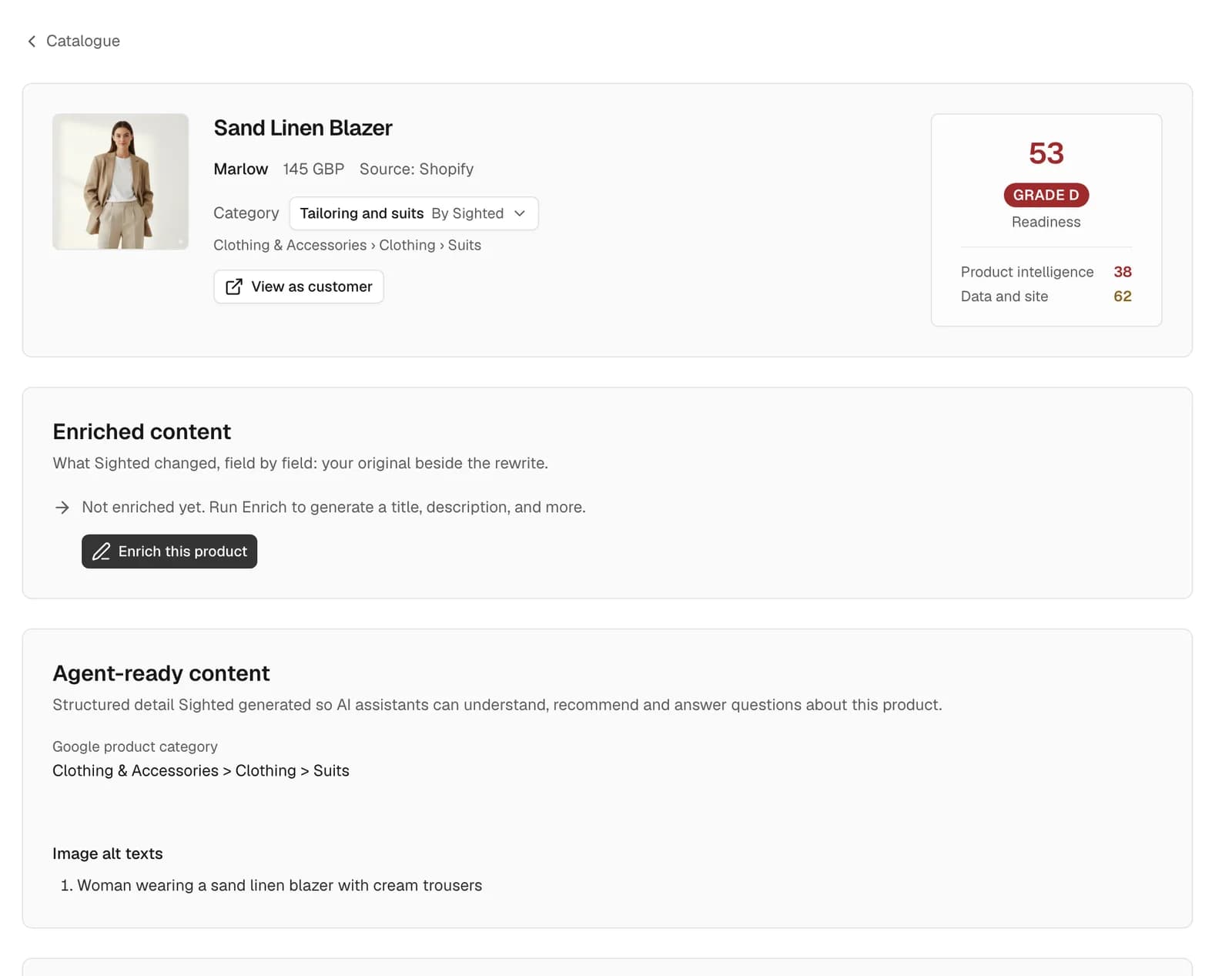
Enrichment writes the missing details from your own product information: the product record, the product page, facts you have confirmed for the whole store and any instructions you have saved. A photo is used only for what it visibly shows. Sighted does not take a material, a fit, care instructions or a size from a photo.
For the duvet, the tog rating and the wash temperature come from the product page, so Sighted writes them. The anti-allergy filling is in a supplier's sheet that was never added to the store, so it stays unwritten until you add it to the product.
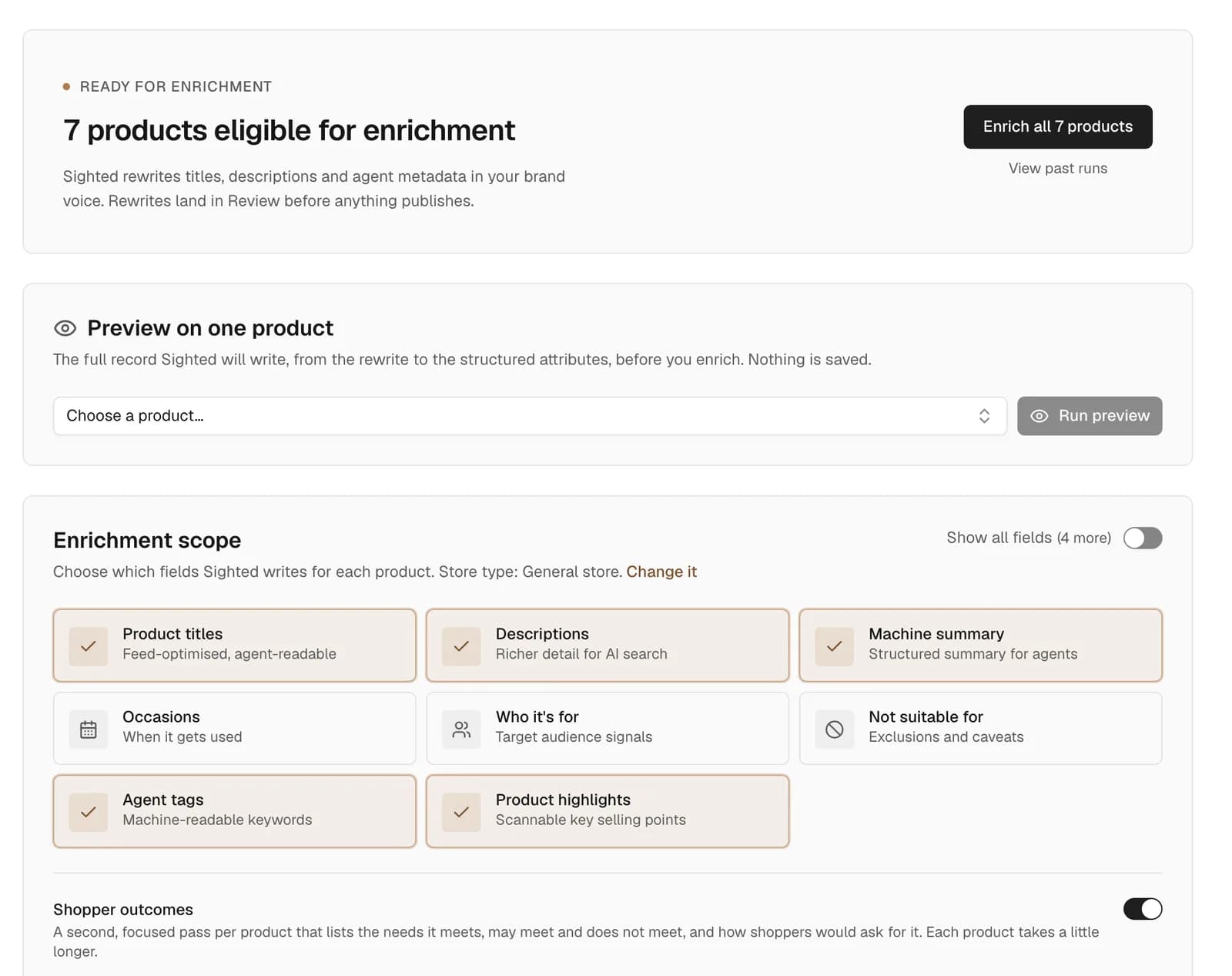
By default nothing publishes until you approve it. Each rewrite waits in Review, where you approve, edit or reject it, and a claim Sighted cannot verify from your information is held for you to keep or drop. On a connected Shopify store, an approved change can be reverted to your original wording.
What should an optimised feed say?
The feeds are built from the approved record, so a rewrite you rejected or have not reviewed stays out. Here is what goes in, with the duvet's row once its filling has been added to the product and the rewrite approved.
| Part of the feed | What it carries | For the duvet |
|---|---|---|
| Title and description | Your approved wording, brand first in the title | “King Size Duvet, 10.5 Tog” after the brand name |
| Product details | Specifications (Google's product detail attribute) | Filling: anti-allergy hollowfibre |
| Product highlights | Short selling points (Google's product highlight attribute) | Machine washable at 60 degrees |
| Questions and answers | Approved pairs (Google's question and answer attribute) | “Will it fit a standard king-size cover? Yes, it measures 230 by 220cm”, from the product page |
| Variants | One item per variant for a connected Shopify store, each with its own price, stock, barcode, colour and size | A duvet sold in single, double, king and super king goes as four items |
Google says its question and answer attribute is intended mainly for conversational experiences such as AI Mode, and that its conversational attributes are optional and leave approval status unchanged (as of November 2026). Its specification asks that product details, highlights and questions and answers do not repeat one another, so each of the duvet's details appears once. The page on Google Merchant Center feeds covers the other attributes Google reads.
Where do the feeds go, and what do you do for each?
Each destination takes the same approved record. Your part differs for each.
| Destination | What Sighted builds | What you do |
|---|---|---|
| Google Merchant Center | A Google Shopping feed of your products, carrying the details you approved | Add the feed's link as a product source in Merchant Center, or connect your Google account and Sighted sends the products |
| Perplexity | A feed at its own link | Apply to Perplexity's merchant programme and, once accepted, supply the feed |
| ChatGPT | A product file in OpenAI's format | If you are an approved OpenAI partner, upload the file |
| Your Shopify store | Approved details written into the store's own product fields | Approve the changes. On Shopify, Sighted writes them for you |
Sighted builds the feeds; whether a destination accepts a feed and shows a product is that destination's decision.
The duvet's retailer adds the feed's link once as a product source in Merchant Center, and Google fetches it every 24 hours. OpenAI's guide says feed onboarding is open to approved partners, who apply by a form (both as of November 2026). Perplexity's announcement of November 2024 describes its merchant programme as free and aimed at large retailers, who also apply by a form.
A Shopify store needs no file for ChatGPT. Shopify's help centre says an eligible store's products are discoverable in ChatGPT through Shopify Catalog with no setup, provided the store sells to customers in the United States (as of November 2026). The page on getting products into ChatGPT Shopping sets out each route.
How do you see what the feed earns?
With your Merchant Center account connected, Sighted shows Google's response to what you sent: how many products are approved, disapproved or pending, the issues holding the most products back, and the impressions and clicks your free listings earned. For the bedding range, that tells you whether Google disapproved anything you sent and whether clicks moved once the new details were live.
The Results page puts the rest beside it. Visibility checks ask ChatGPT, Perplexity and Gemini questions that name the product and questions that only describe the need, then record whether each answer identified the product, recommended it, named your store and linked the product page.
Traffic and sales sit in the same place: sessions, AI-referred sessions, purchases and conversion rate from Google Analytics, clicks and impressions from Search Console, and, for a connected Shopify store, AI-referred orders and sales by product. Read them product by product, beside price, stock and promotions.
How to start
Start with one range and take it through the whole workflow, which the AI shopping visibility platform page describes in full.
- Run the free scan. It checks robots.txt and as many as 50 of your product pages, then reports what assistants can reach and which product details are absent.
- Bring in your catalogue. Sighted connects directly to Shopify; any other store imports a product file (CSV) or a link to a Google Shopping feed.
- Enrich one range you care about, such as bedding ahead of winter, and review each rewrite: approve, edit or reject.
- Publish. Approved details go to your Shopify store and into the feeds for Google Merchant Center, Perplexity and ChatGPT.
- Add the Google feed to Merchant Center, then review Google's approval counts and commonest issues, visibility checks, traffic and sales together each month.
Run the free scan to see which product details your pages leave out.