

AI shopping visibility for Adobe Commerce and Magento stores
An Adobe Commerce catalogue can hold thousands of products whose selling points sit deep in descriptions. An extending oak dining table that seats eight, named only “Extending Dining Table”, is hard to match to a shopper who asks Gemini for an oak table for eight. Sighted analyses visibility product by product, finds the catalogue gaps, enriches product information, optimises and publishes feeds for AI agents and Google Shopping, and measures visibility, traffic and sales afterwards.
What do shoppers ask AI assistants that your catalogue leaves unanswered?
Take one request, “an extending oak dining table that seats eight”, and set it against the record for a table you sell. Go requirement by requirement and write down where the catalogue states each one.
| The shopper asks for | Where the catalogue says it | What that leaves |
|---|---|---|
| Extending | In the product name | Stated where it is easy to find |
| Seats eight | “Seats six to eight” in the third paragraph of the description | Missing from the name and from every attribute |
| Oak | The material attribute reads “Wood”; “solid oak top” is in the description | An attribute vaguer than the description |
You can run this on your ten best sellers today with nothing but a spreadsheet: write the request, then mark each requirement as stated up front, buried or absent, and treat the last two as gaps to fill.
How does Sighted work with an Adobe Commerce or Magento store?
Sighted does not connect to Adobe Commerce or Magento directly: your catalogue arrives as a product file (CSV), or through a link to a Google Shopping feed in CSV form, and your developer or agency maps the enriched details into the platform's own import. Give each product an id (its SKU works) and its name, and add the full page address, image and price.
From there the work is the same on Adobe Commerce and Magento Open Source. Every imported product gets an AI readiness score, a grade and a count of its issues, which shows across the whole catalogue where records like the dining table's need attention.
What does Sighted write, and what do you approve?
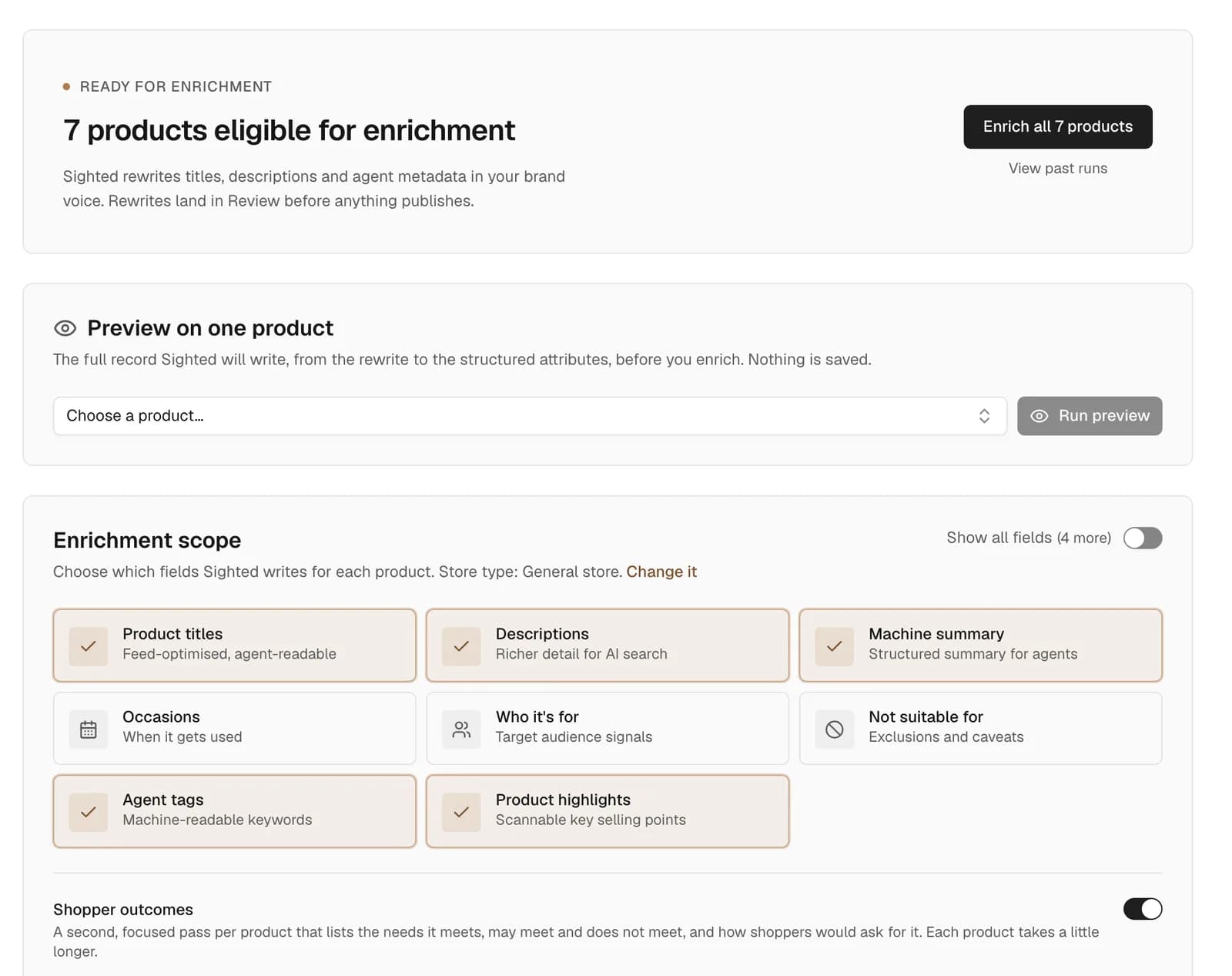
The missing details are written from your own product information. For the dining table that could mean a name that says oak and seats six to eight, specifications giving the closed and extended lengths your description already states, and an FAQ on how many it seats when extended.
Adobe Commerce has its own Catalog Enrichment, which its documentation describes as improving product names and long descriptions for English-language catalogues, as of November 2026. Sighted writes names and descriptions as well, and adds the attributes, specifications and question-and-answer pairs that carry facts such as “seats eight”.
By default, every rewrite is held in Review until you approve it, and you can edit or reject any of them. A merchandising team can publish a batch at once, and a claim Sighted cannot verify from your information is held separately for a decision.
What happens after you approve?
Approved details are published as feeds for Google Shopping and AI agents, with the approved names, descriptions, product details and question-and-answer pairs in them. Sighted also gives you a file of your enriched product details, which carries your own product ids and the review status of each product.
Adobe Commerce's import (System, Data Transfer, Import) has an Add/Update behaviour that adds new data to products already in the catalogue, according to Adobe's documentation, as of November 2026. Your developer or agency maps the file into that import, so the dining table's own page can say oak and seats eight.
How do you track recommendations, visits and sales?
Sighted asks ChatGPT, Perplexity and Gemini questions that name the dining table and questions that only describe it, such as “oak dining table that seats eight”. For each answer it records whether the product was identified and recommended, whether your store was named and whether the link led to the product page. The check before enrichment is compared with the latest one.
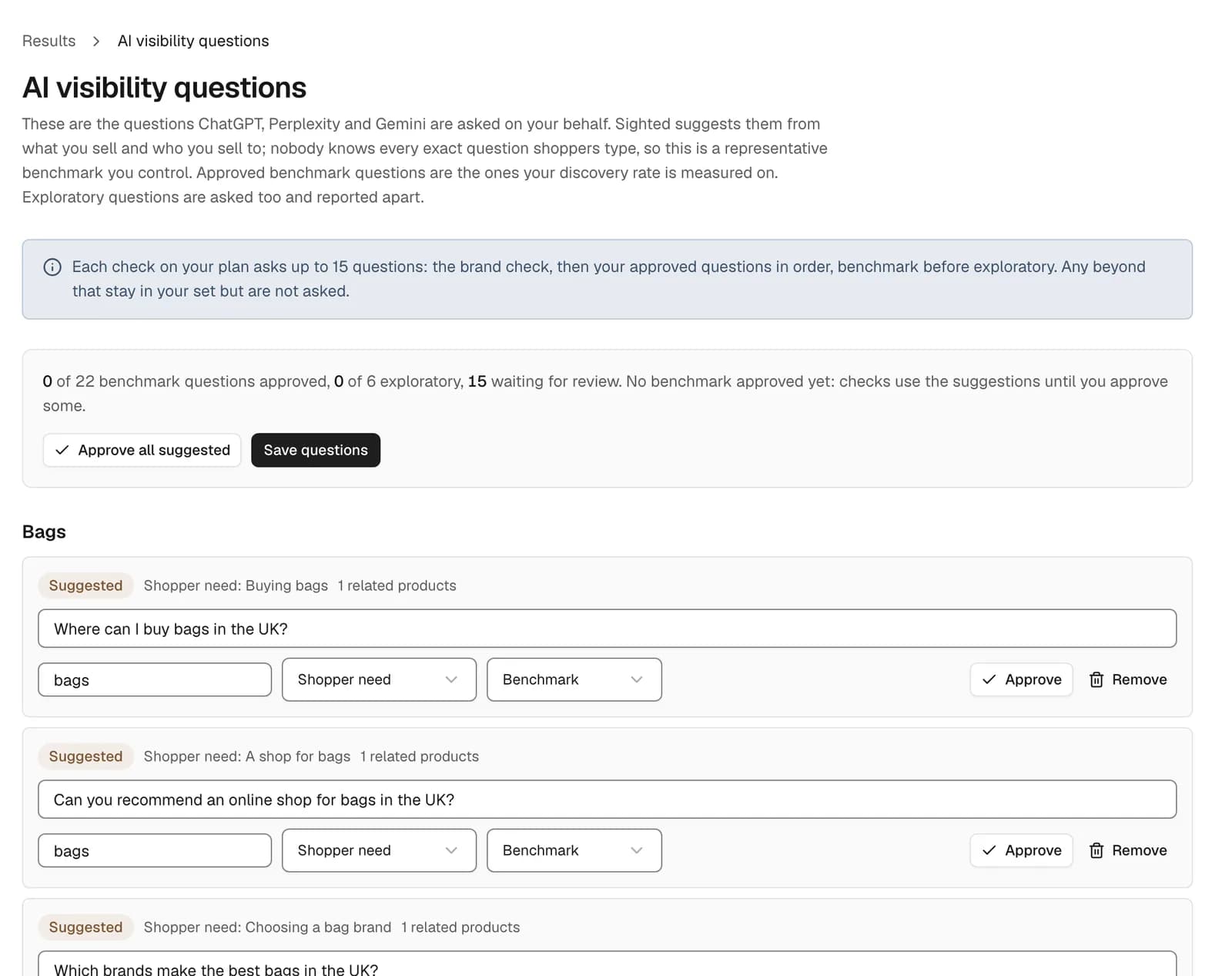
Store-wide checks use a question set that Sighted suggests from your catalogue. You edit, add, remove and approve the questions, and the approved set is asked again at each check so results stay comparable.
Visits and sales come from Google Analytics and Search Console, which connect for any store. The Results page brings in sessions, AI-referred sessions, purchases and conversion rate, plus clicks and impressions from search, next to the assistants' answers. Review them with your trading calendar open: a price cut or a promotion in the same weeks moves the same numbers.
Steps to start on Adobe Commerce or Magento
Start outside the Admin, with Sighted's free scan: enter your store's address and it reads robots.txt and up to 50 product pages, then reports which pages AI assistants can reach and the product details those pages leave out.
- Run the free scan on your store's address.
- Take ten best sellers and mark each shopper requirement as stated up front, buried or absent.
- Prepare a product file with an id and name for each product, plus full page address, image and price, or a link to a Google Shopping feed in CSV form, and import it.
- Approve the suggested questions and run a visibility check before enrichment.
- Enrich one category, then approve, edit or reject the rewrites in Review.
- Point Merchant Center at the Google Shopping feed and have your developer map the file of enriched details into the import.
- Connect Google Analytics and Search Console and review recommendations, visits and sales in the Results page.
See what AI assistants can reach on your Adobe Commerce product pages and which details are missing.